

Learners get stuck at the same points, and your team ends up answering the same handful of questions on repeat. An AI tutor can take that load — but only if it answers from your course material, not from whatever the underlying model happens to know about the topic in general. That distinction is what retrieval-augmented generation (RAG) is for.
Why not just point learners at a chatbot?
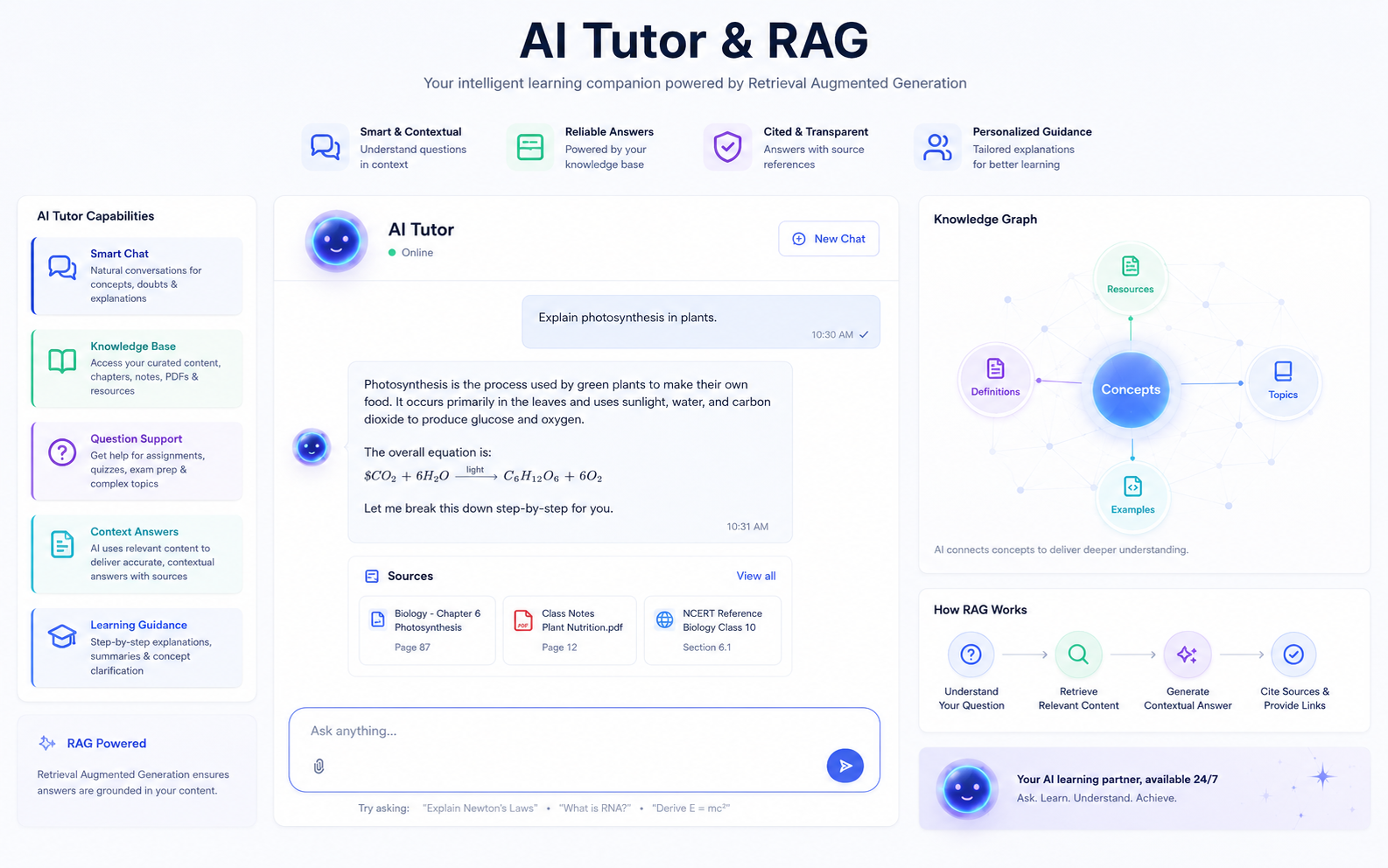
A raw language model, asked a question with no constraints, will answer fluently whether or not it actually knows the specifics of your course — and it has no way to tell a learner "I'm guessing" versus "this is exactly what your material says". For training content, that's a real problem: a confidently wrong answer about a compliance procedure or a safety step is worse than no answer at all. RAG constrains the model by giving it something to answer from: before it responds, the system retrieves the passages of your own course content most relevant to the question, and the model answers using those passages rather than its general knowledge.
The practical stack, step by step
- Ingestion: your courses, PDFs, transcripts and docs are split into chunks small enough to be individually relevant, and each chunk is converted into a vector embedding — a numerical representation of its meaning.
- Retrieval: those embeddings are stored in a Postgres database with the pgvector extension. When a learner asks a question, it's embedded the same way and compared against the stored chunks to find the closest matches — the passages most likely to actually answer it.
- Generation: a FastAPI backend passes the retrieved passages and the question to OpenAI's model, with a system prompt that instructs it to answer only from what it was given, and to say so plainly when the retrieved content doesn't cover the question rather than filling the gap with a guess.
Where it actually lives
The tutor doesn't need to be a separate destination — it sits inside your existing LMS or course site as a chat panel alongside the lesson the learner is already on, answering in the context of that specific course rather than searching your entire content library for every question. We built and run this pattern on Pragyanta; see it broken down further in the AI tutor demo.
What can go wrong, and why it usually comes back to retrieval
Most of the failure modes people worry about with AI tutors — wrong answers, off-topic tangents, made-up citations — trace back to weak retrieval rather than a bad model. If the chunking splits content awkwardly (mid-sentence, or without enough surrounding context), the retrieved passages won't actually answer the question even if they're topically related, and the model ends up filling the gap itself. Getting chunk size and retrieval ranking right is unglamorous work, but it matters more to answer quality than which specific model generates the final text.
Want an AI tutor on your courses? Read the AI Tutor service or add an AI tutor to your learning platform.
Sources & Further Reading:
Google Search Central Documentation ·
Moz SEO Blog ·
Search Engine Land
Turn this article into a practical action plan
If this topic affects your site, campaign, or LMS growth path, we can help translate it into changes that actually fit your current setup.
Discuss This TopicFollow the related journey
Use the article as one step, then move into the service, portfolio, or broader blog context around it.